4. Search Concepts & Tuning
This chapter explains what the engine actually does with your configuration — enough to diagnose a search that is too slow, runs out of memory, or "runs out of states" before finding a solution. It is useful to users tuning a search and to contributors working on the engine.
- The search loop
- States and the state database
- Hashing and deduplication
- Choosing hash properties
- Hash step tolerance
- The NUMA / threading model
- Tuning checklist
- Environment overrides
The search loop
JaffarPlus performs a best-first breadth search. The breadth part: it advances one step (one unit of depth) at a time, expanding the entire current frontier of states before moving on to the next depth. The best-first part: within that, it orders states by reward so the most promising ones are expanded and kept first. One step does this:
- Take the frontier — every state discovered at the current depth.
- Branch — for each state, apply every legal input (from
Allowed Input Sets), advancing the emulator one frame (plus any frame-skip) to produce one successor state per input. - Score & hash — compute each successor's reward (rules + magnets) and a hash of its
Hash Properties. - Prune — discard successors marked
Trigger Fail, and discard any whose hash was already seen (deduplication). - Advance — the survivors become the next frontier, reward-ordered. Repeat from step 1.
flowchart LR
  F["Frontier<br/>states at depth k"] --> B["Branch<br/>apply each legal input"]
  B --> S["Score + hash<br/>each successor"]
  S --> P{Prune?}
  P -->|"Trigger Fail"| X["discard"]
  P -->|"hash already seen"| X
  P -->|survives| N["Next frontier<br/>depth k+1, reward-ordered"]
  N -->|"contains a win?"| W["Solution"]
  N -->|otherwise| F
Because every state at depth k is expanded before any at depth k+1, the first win reached is reached by a shortest input sequence — the fastest route, which is the whole point of a TAS. Reward changes the order and priority of exploration (and which state is reported as best), not the depth at which a solution is first found. This is why the GridWalker test asserts an exactly-8-move solution regardless of thread count: different runs may surface a different 8-move path, but never a shorter or longer optimum.
A concrete picture
The bundled GridWalker puzzle makes this tangible. A cursor starts at the top-left (0,0) of a 5×5
grid and must reach (4,4); the only thing that distinguishes one state from another (its
Hash Properties) is the cursor's (Pos X, Pos Y). Each cell below is labelled with its depth
— the fewest moves needed to reach it — and shaded darker as depth grows, so each diagonal band is
one frontier the search expands in turn:
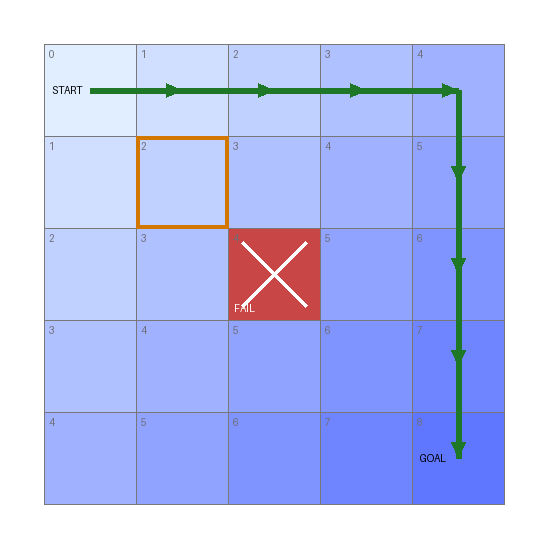
- Depth ordering → shortest path. The goal sits at depth 8 (
4 + 4), so the optimal solution is 8 moves. Since the search only reaches depth 8 after exhausting depths 0–7, the first win it finds is one of those 8-move paths (green). - Pruning. A rule fails the centre cell
(2,2)(Trigger Fail, red ✕); the search discards it immediately and never explores anything beyond it. - Deduplication. The outlined cell
(1,1)is reachable two ways — right-then-down or down-then-right — but both produce the same(Pos X, Pos Y), hash identically, and collapse to one state. Without this, the number of input paths grows exponentially with depth; with it, the search is bounded by the number of distinct states (here, at most 25 cells). This collapse is what makes the search tractable, and it is the subject of the next section.
States and the state database
A state is the serialized, searched portion of the game at one point in time. Its size is the dominant factor in how many states fit in memory and how fast each one is copied/hashed.
The state database (Engine Configuration > State Database > Max Size (Mb)) is the memory
pool holding the frontier. When it fills, the engine cannot admit new states; if the frontier
empties before a win, the run ends with Engine ran out of states. That message means one of:
- there is genuinely no solution under your inputs/rules (e.g. an over-aggressive
Trigger Fail), - the state database is too small to hold the frontier needed to reach the win, or
- each state is larger than it needs to be (see making states smaller).
The state database is partitioned per NUMA domain (see below); the
Max Size (Mb) budget is shared across domains.
Making states smaller
Smaller states mean more of them fit and each is processed faster. Two levers:
Disabled State Properties(in the emulator section) excludes save-state memory blocks that don't affect the search (e.g. video/CHR memory, audio state). This is the biggest single win for most console cores — dropping a large unused block can shrink state size dramatically.Bypass Emulator State/ game-managed state — advanced; lets a game serialize only the bytes it cares about.
Hashing and deduplication
To avoid exploring the same situation twice, the engine hashes each state and skips any hash it has
already seen. Concretely, the two ways of reaching (1,1) in the grid above converge to a single
state:
flowchart LR
  S["(0,0)"] -->|Right| A["(1,0)"]
  S -->|Down| B["(0,1)"]
  A -->|Down| C["(1,1)"]
  B -->|Right| C
  C --> M["same Hash Properties<br/>→ same hash → kept once"]
The hash database (Engine Configuration > Hash Database) stores those hashes:
Enabled— turn deduplication on (almost always yes).Max Store Size (Mb)— memory budget for stored hashes.Max Store Count— how many rolling generations of the hash store to retain before old ones are retired. More generations remember states longer (fewer re-explorations) at higher memory cost.
Internally the hash store is tiered (a fast per-domain layer in front of a shared global layer) so that the common "have I seen this?" check stays cheap under many threads. As a user you control it only through the two size/count keys above and through what gets hashed:
Choosing hash properties
Game Configuration > Hash Properties is the most important correctness/performance lever you
control directly. It defines a state's identity: two states whose hash-property values match are
considered the same and deduplicated.
- Too few / too coarse → distinct situations collide and get discarded; the engine may miss the solution.
- Too many / too noisy → situations that are effectively identical look different; the state count explodes and you run out of memory.
Hash exactly the properties that matter to the outcome (position, room, HP, key game flags) and
nothing cosmetic (animation frames, RNG, timers you don't care about). For Prince of Persia, this is
why Disable Non-Gameplay RNG matters: it stops torch/animation RNG churn from making otherwise
identical states hash differently.
Hash step tolerance
Runner Configuration > Hash Step Tolerance controls how eagerly states are re-hashed across
consecutive steps. 0 hashes every step (maximum precision, maximum state count). A higher value
lets a state persist for a few steps before being re-considered for deduplication, collapsing
near-identical successive frames — fewer states, faster, at the risk of skipping over a
fine-grained distinction. Start at 0; raise it only if the state count is unmanageable and you've
confirmed the lost precision doesn't drop the solution. (Trigger Checkpoint carries its own
per-milestone Tolerance, described in chapter 3.)
The NUMA / threading model
JaffarPlus is built for many-core machines. It parallelizes state expansion across OpenMP threads, and it is NUMA-aware: on a multi-socket / multi-domain machine, each NUMA domain gets its own slice of the state database, and one thread per domain acts as that domain's delegate for allocating the domain-local queues. This keeps each thread working mostly on memory close to it.
(Source: source/numa.hpp, source/stateDb.hpp.)
Practical consequences:
- Thread count comes from OpenMP (
OMP_NUM_THREADS), or can be overridden with theJAFFAR_ENGINE_OVERRIDE_MAX_THREAD_COUNTenvironment variable. With one thread the engine collapses to a single NUMA domain. - Pin your threads on production runs (
OMP_PROC_BIND=true/close, ortaskset). Unpinned or oversubscribed threads can share cores; the engine identifies domains by the OpenMP thread id (dense and unique) precisely so that core-sharing does not corrupt domain assignment, but pinning still gives the best and most reproducible performance. - Determinism of depth, not path. More threads can surface a different optimal path, but best-first search guarantees the same optimal depth.
Tuning checklist
When a search is too slow or runs out of states, work down this list:
- Shrink the state. Add unused memory blocks to
Disabled State Properties. Biggest single win on most cores. - Tighten
Hash Properties. Remove anything cosmetic/noisy. For PoP, setDisable Non-Gameplay RNG. - Tighten
Allowed Input Sets. Fewer legal inputs per state = lower branching factor. Gate inputs with conditions so only sensible moves are tried in each situation. - Prune with
Trigger Fail. Kill dead ends (death, wrong room) early. - Steer with a magnet. A standing magnet toward the goal focuses the frontier instead of exploring uniformly.
- Give the databases room. Raise
State Database>Max Size (Mb)and theHash Databasebudgets if you have RAM to spare. - Consider frame-skip. A non-zero
Frameskip>Ratesearches coarser but advances faster; useful for long traversals where single-frame precision isn't needed. - Use all your cores, pinned. Set
OMP_NUM_THREADSand pin them.
Environment overrides
Several settings can be overridden at runtime via environment variables, primarily for testing and benchmarking without editing the config:
| Variable | Overrides |
|---|---|
JAFFAR_DRIVER_OVERRIDE_DRIVER_MAX_STEP |
Driver Configuration > Max Steps |
JAFFAR_ENGINE_OVERRIDE_MAX_STATEDB_SIZE_MB |
Engine Configuration > State Database > Max Size (Mb) |
JAFFAR_ENGINE_OVERRIDE_MAX_HASHDB_SIZE_MB |
Engine Configuration > Hash Database > Max Store Size (Mb) |
JAFFAR_ENGINE_OVERRIDE_MAX_THREAD_COUNT |
OpenMP thread count |
JAFFAR_IS_DRY_RUN |
Set internally by --dryRun; skips the NUMA check and trace-file loading during config validation |
See the Tooling Reference for the command-line flags.