3. Rules, Conditions & Rewards
This is the chapter that turns JaffarPlus from "explores states" into "solves your problem". The engine keeps a frontier of states and expands the most promising ones first; you define what "promising" means through a reward, and what counts as winning, failing, or worth checkpointing through rules. Get this right and a search that would never terminate becomes one that finds an optimal solution in seconds.
The figures in this chapter are schematic diagrams of the bundled GridWalker puzzle (
docs/examples/gridwalker.jaffar): a cursor that moves Up/Down/ Left/Right on a 5×5 grid, starting at the top-left(0,0)and trying to reach the bottom-right(4,4). It runs on the ROM-free test core, so every rule and reward shown here is something you can run and reproduce yourself (see Getting Started).
- The mental model
- Properties: naming game memory
- Conditions
- Rules
- Core actions
- The GridWalker rule set
- Reward shaping (and magnets)
- Checkpoints and tolerance
- Frame-skip
- Design recipes
The mental model
Every state the engine reaches has a single reward value (a float). The search keeps a frontier
of states and expands the highest-reward ones first. So:
- Reward is a compass, not a score. Its absolute value is irrelevant; only the ordering it induces matters. A state with higher reward gets explored sooner.
- Reward has two sources. Discrete bumps from rule actions (
Add Reward), and any continuous gradient the game computes (for GridWalker, "closer to the goal is better"). The two are summed. - Rules also gate the search. A rule can mark a state as a win (a solution), a fail (pruned, never expanded), or a checkpoint (a milestone).
A search succeeds when a state triggers a Trigger Win. It is your reward design that makes the
engine walk toward that win instead of wandering the entire state space.
Properties: naming game memory
A property is a named, typed view into the game's memory. GridWalker exposes five
(source: games/test/gridWalker.hpp):
| Property | Meaning |
|---|---|
Pos X, Pos Y |
The cursor's column and row — the only things that distinguish one state from another. |
Distance |
Manhattan distance from the cursor to the goal (a derived value). |
Steps |
How many moves have been made. |
Goal Reached |
Whether the cursor is on the goal cell. |
Properties are registered by the game's C++ code (not the config); the config refers to them by name in three places:
Game Configuration>Hash Properties— which properties define a state's identity. GridWalker hashesPos XandPos Y, so two routes that reach the same cell are treated as the same state.Game Configuration>Print Properties— which to show in status output.- Inside conditions — to test a value.
To list a game's properties, read its header under games/ or see
Adding a Game. Datatypes (UINT8…FLOAT64, BOOL) and endianness are in the
Configuration Reference.
Conditions
A condition is a single comparison: a property, an operator, and a value.
{ "Property": "Pos X", "Op": "==", "Value": 4 }
Property— the left operand (a registered property name).Op— one of==,!=,>,>=,<,<=,%0,%N,BitTrue,BitFalse.%0/%N: property moduloValueis zero / non-zero.BitTrue/BitFalse: the bit at indexValueis set / clear.Value— the right operand. A number or boolean is an immediate value; a string is treated as another property name, so you can compare two properties (e.g.Pos XagainstPos Y).
Conditions appear in two contexts, with identical grammar: inside a rule (when does this rule fire?) and inside an input set (when is this input legal?). Within a single list, all conditions must hold — they are AND-ed. There is no OR/NOT; express alternatives as separate rules or input sets.
Rules
A rule couples a set of conditions to a set of actions.
{
  "Label": 200,
  "Conditions": [ { "Property": "Pos X", "Op": "==", "Value": 4 } ],
  "Satisfies": [],
  "Actions": [ { "Type": "Add Reward", "Value": 100.0 } ]
}
Label— a unique number identifying the rule.Conditions— when all hold, the rule fires. An empty list means "always".Actions— what firing does (see below).Satisfies— labels of other rules to also mark as satisfied when this one fires. Use it to build hierarchies: satisfying a "level complete" rule can auto-satisfy the checkpoints leading up to it.
Core actions
These five action Types are available to every game (source: source/game.hpp):
Type |
Extra keys | Effect |
|---|---|---|
Add Reward |
Value (number) |
Add Value to the state's reward. Negative values penalize. |
Trigger Win |
— | This state is a solution; the search can stop (per End On First Win State). |
Trigger Fail |
— | Prune this state; it is never expanded. Use it to kill dead ends (death, out-of-bounds, a wrong room). |
Trigger Checkpoint |
Tolerance (number) |
Record a milestone (see below). |
Trigger Save Solution |
Path (string) |
Write the current solution to Path when the rule fires. Handy for capturing the route to a milestone mid-run. |
A game may register additional action types (most notably reward magnets — see below), but GridWalker uses only these five, which is enough to demonstrate every kind of rule.
The GridWalker rule set
docs/examples/gridwalker.jaffar defines three rules that, between
them, exercise win, fail, checkpoint, save-solution, reward, and rule-chaining:
"Rules": [
  { "Label": 100,
    "Conditions": [ {"Property":"Pos X","Op":"==","Value":2}, {"Property":"Pos Y","Op":"==","Value":2} ],
    "Actions": [ {"Type":"Trigger Fail"} ] },

  { "Label": 200,
    "Conditions": [ {"Property":"Pos X","Op":"==","Value":4} ],
    "Actions": [ {"Type":"Add Reward","Value":100.0},
                 {"Type":"Trigger Checkpoint","Tolerance":8},
                 {"Type":"Trigger Save Solution","Path":"/tmp/jaffar.gridwalker.win.sol"} ] },

  { "Label": 300,
    "Conditions": [ {"Property":"Pos X","Op":"==","Value":4}, {"Property":"Pos Y","Op":"==","Value":4} ],
    "Satisfies": [ 200 ],
    "Actions": [ {"Type":"Add Reward","Value":100000.0}, {"Type":"Trigger Win"} ] }
]
Mapped onto the grid, here is where each rule fires:
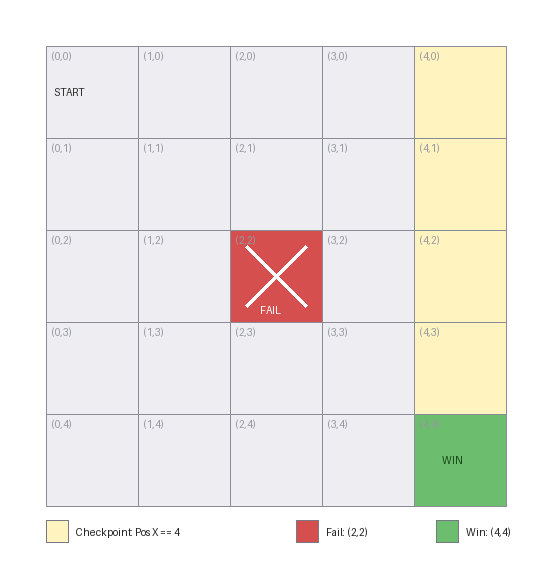
- Rule 100 —
Trigger Fail(red). When the cursor is at the centre(2,2), the state is pruned: the engine discards it and never explores any route continuing through it. This is how you forbid death, out-of-bounds, or known dead ends. - Rule 200 — checkpoint + reward + save (yellow column). Reaching any cell in column
Pos X == 4adds+100to the reward, records aTrigger Checkpoint, and writes the current route to disk withTrigger Save Solution. This is an intermediate milestone — a partial goal worth steering toward and worth capturing. - Rule 300 —
Trigger Win(green). Reaching the corner(4,4)adds a dominating+100000and marks the state a win. ItsSatisfies: [200]also marks rule 200 as met, so arriving at the corner counts the column-4 milestone as achieved even if the win is reached first.
Because Pos X and Pos Y are the hash properties, the engine treats each grid cell as a single
state and returns the shortest (8-move) route — see
Search Concepts for the depth/pruning/dedup view of the
very same puzzle.
Reward shaping (and magnets)
Rules give discrete reward at specific cells (the +100 in column 4, the +100000 at the goal).
On top of that, GridWalker adds a continuous gradient: its reward decreases with distance to the
goal, so every step that gets closer is preferred. Shaded by reward, the grid looks like this:
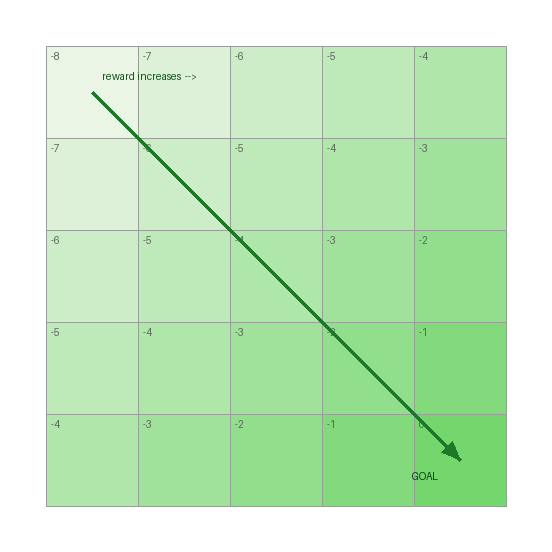
This gradient is what makes the search walk toward the goal instead of expanding the grid uniformly: between two equally-deep states, the one nearer the goal has higher reward and is expanded first.
Where do magnets come in? GridWalker's gradient is hard-coded in its C++
(calculateGameSpecificReward returns -Distance). Richer games make the same idea configurable
by exposing reward magnets — game-specific actions that let you place such a gradient from the
.jaffar file, no recompiling. They take one of two shapes:
- Point magnet — pulls a positional property toward a target, e.g. Prince of Persia's
{"Type": "Set Kid Pos X Magnet", "Intensity": 1.0, "Position": 180}. The contribution isIntensity × −|current − Position|: positive intensity pulls towardPosition, negative pushes away. (This is exactly GridWalker's distance gradient, but tunable per state.) - Scalar magnet — multiplies a single property by an intensity, e.g.
Set Level Door Open Magnet(reward rises as a door opens). Takes onlyIntensity.
Magnets are not part of the engine core — each game registers its own in parseRuleActionImpl. To
see which a game supports, read that method (a chain of if (actionType == "Set … Magnet") blocks);
the naming is consistently Set <Thing> Magnet. GridWalker registers none, because its single fixed
gradient is all a 5×5 grid needs.
Checkpoints and tolerance
Trigger Checkpoint records progress and carries a Tolerance (GridWalker uses 8). Tolerance
interacts with deduplication: normally two states with the same Hash Properties are merged, but
right after a checkpoint the engine tolerates a number of additional steps before re-merging, so it
does not immediately discard the slightly-different states that branch off a milestone. Larger
tolerance = more states kept around a checkpoint = broader local search at the cost of memory. The
related global knob is Runner Configuration > Hash Step Tolerance
(see Search Concepts & Tuning).
Frame-skip
A decision the search makes does not have to be a single emulator frame. With
Runner Configuration > Frameskip > Rate > 0, each chosen input is held for extra frames before
the next decision, so the search tree is shallower (fewer decisions) while the recorded solution
still contains every played frame:
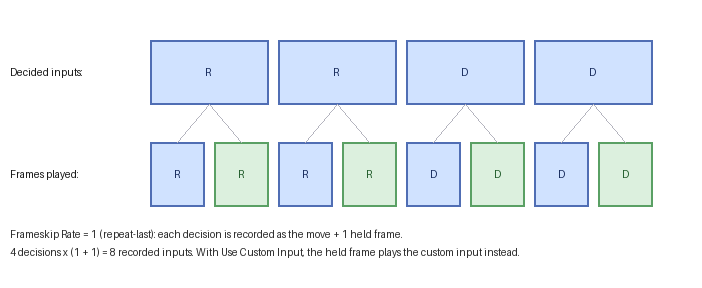
On GridWalker with Rate: 1 (repeat-last), each decision advances the cursor twice, so the corner is
reached in 4 decisions but the saved solution records 8 inputs — the move plus one held copy
each. With Use Custom Input, the held frames play a fixed Custom Input (e.g. a no-op) instead of
repeating the decision. Frame-skip trades search precision for depth and is most useful on long
traversals where single-frame timing does not matter; the keys are detailed in the
Configuration Reference and the trade-off
in Search Concepts.
Design recipes
- Make the win dominate. Give
Trigger Win(or the rule leading to it) a reward far larger than any intermediate bonus, so a winning route always sorts to the front — GridWalker's+100000versus the+100checkpoint is exactly this. - Prune aggressively. Every
Trigger Failremoves a whole subtree from the search. Death, a wrong room, unrecoverable HP loss — fail them early. - Shape, then bump. Let a continuous gradient (a built-in distance reward, or a standing magnet)
pull the search toward the goal, and use
Add Rewardrules for sharp bonuses at milestones (gates, keys, checkpoints). - Watch the state explosion. Hashing noisy properties (timers, RNG, cosmetic counters) makes
near-identical states look different and floods the database. Keep
Hash Propertiesminimal — GridWalker hashes onlyPos X/Pos Y. (For games with cosmetic RNG, such as Prince of Persia, there is usually an emulator option to suppress it; see the Configuration Reference.)
The next chapter explains why these choices affect performance — how the search, hashing, deduplication, and the state database actually work.